
 |
| Blog Walker |
Friday
Add An Animated Tabbed Widget To Blogger
Increase or Decrease Your Font Size On Blogger Dynamically - The Text Resizing Widget
The Text Resizing Widget (English)

FOR WEBMASTERS - A LITTLE COMPLEX PROCEDURE1. Navigate to "Design>>Edit HTML" and make a backup of your template by clicking on the "Download full template" link at the top of the page. Once the back up is over, expand your blogger template and search for the following piece of code. Use CTRL+F to speed up the search.
Thursday
Tips Wawancara untuk Lolos Melamar Pekerjaan
 |
| Blog Walker |
Berikut tips rahasia sukses wawancara saat melamar pekerjaan;
1. Berapa gaji yang Anda minta?
Jawab: Sebutkan gaji yang besarnya realistis. Lihat mata pewawancara, sebutkan jumlah, dan berhentilah bicara. Jangan bohong tentang gaji yang Anda terima di kantor sebelumnya, bila Anda sudah bekerja. Bila Anda merasa bahwa gaji Anda di kantor yang sekarang terlalu kecil, berikan penjelasan.
Persiapan Jelang Wawancara Kerja
Bak atlet yang mempersiapkan sebuah laga, maka wawancara kerja juga perlu persiapan sebelumnya. Asal tahu saja, hal-hal remeh termasuk kerapihan dan sikap Anda menjadi bagian dari penilaian. Karena, setidaknya sepekan sebelum wawancara, Anda harus sudah mulai menyiapkannya.
Dalam situs Askmen.com dijelaskan kaitan psikologis ritual pra-wawancara dengan kesuksesan Anda mendapatkan pekerjaan impian. Persiapan diri sebelum wawancara dapat menaruh beberapa kekhawatiran Anda dengan memastikan Anda siap saat hari wawancara tiba. Ini dengan asumsi, Anda sudah melakukan persiapan rutin, seperti melatih jawaban Anda atas pertanyaan Anda harapkan untuk ditanyakan dan belajar tentang perusahaan Anda yang Anda lamar.
How To Speed Up Your Blogger Blog?
This is my second post about speeding up a blogger/blogspot blog. If you missed out the first one, then click here to have a look at it - Speed Up Your Blogger/Blogspot Blog. I had been working on this topic myself for the past few weeks and few days before, I found a post about the same topic on Google Buzz. I wanted to share some of the tips mentioned there with my readers. Although, this topic deals with terms that sound weird, I have tried my best to keep them as simple as possible because, I always write things aimed at the newbies.
How To Speed Up Your Blogger
Basically, the speed with which your blog loads is inversely proportional to the time it takes to load. I have explained this post in terms of reducing the load time. I found an article which mentioned that even the site/blog load time contributes significantly to the Google PR. So, how do I find out whether my site load time is quick or slow. If you need an answer to this question, then visit the following link "Website Optimization Speed Report" and enter your URL.
Tuesday
Tujuh Tipe Hacker yang Patut Diwaspadai
Berbagai tipe hacker berseliweran di dunia maya. Bila Anda tidak
ingin menjadi korban, salah satu langkah yang bisa Anda ambil adalah
dengan mengenali jenis, motivasi dan objek dari hacker-hacker tersebut.
Berikut daftar tipe-tipe hacker yang bisa Anda cermati :
Monday
Making Rounded Corners With CSS3 On Blogger

Saturday
Cara Mendaftar Adsenscamp Bisnis PPC

Sebelum membaca tutorial ini silahkan daftar di adsenscamp terlebih dahulu KLIK DISINI
Lihat Contoh Gambar
Untuk mengefektifkan pemasangan iklan advertiser pada blog yang terdaftar di publisher AdsenseCamp saat ini tiap iklan yang terdaftar harus disesuaikan dengan kategori iklan tersebut. Hal tersebut kami berikan agar iklan yang tampil pada blog publisher sesuai dengan content yang diusung oleh blog tersebut.
3 Tips To Make Images SEO Friendly On Blogger
 I sat down last night to find out why Wordpress blogs have better search engine rankings when compared to the Google's Blogger. The answer which I found was that Wordpress blogs are highly SEO optimized (especially those run on Thesis Theme), meaning that the plugins on WP make it flexible for the user to optimize his/her blog more compatible with the search engine algorithms. Whereas, this is not the case with blogger.
Thursday
99Shoutbox: Create Instant Embeddable Shoutbox For Your Website
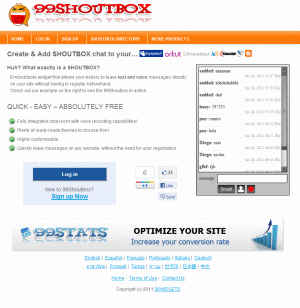
99Shoutbox Example
99Shoutbox is an embeddable widget that can live anywhere in the web (website, blog, social networking page and more…) leaving a door open for the visitors of the page to interact with each other or leave a message for the site owners in real-time.
Wednesday
ShoutMix stop their service for Free Member and Kick Freemium
Free service has to stop
Thanks for using ShoutMix for all these year. I have been providing free shoutboxes on the World Wide Web for over 7 years now. It wasn't long before I realized being 100% free is not sustainable. Just before ShoutMix's first birthday, it almost had to be closed.
ShoutMix has tried to work with the freemium business model ever since. Conversion rates were low with the first version. With the second version, things improved and I have had more paying customers. Fortunately people liked the service and started paying for more features.
Tuesday
Moving widgets (gadgets) from an old template to a new one!
The most common problem at the time of uploading a new template is that we “lose our widgets”. Is there a way of installing a new template without having to get rid of ourbeloved widgets? The answer is yes, and yes, it’s simple  .
.
.
QuickT :: How to show only labels with more than X posts!
1. Go to Layout> Edit HTML and do NOT check the “Expand widget templates” box:
2. Look for this line of code:
<b:widget id='Label1' locked='false' title='Labels' type='Label'/>How To Add Label Rss Feed Link Button To Each Blogger Categories

How to Add Rss Feeds Image button in front of all your blogger labels, so that your readers can subscribe to your particular categories only they like the most instead of subscribing for your all blog posts.This is very useful for blogs who have mixed type content with several different categories in there blog.
How To Add Tweet This (Twitter) Button To Each Blogger Post

Hi friends “Tweet this” button will enable your readers to share your post with other Twitter users. This will help promote your blog and possibly increase your Twitter followers.
This button will appear at the bottom area of each post.
How to display the Scripts and Codes in blogger post

How To Hide / Remove Status Message Bar In Blogger Blogs

What is "Status Message Bar" in Blogger Blog?
In Search pages or in Label Pages You can observe a Bar with some message at the top of posts.
that is Status Message Bar.
It should be like...:-)
How To Disable Official Blogger Lightbox
 Blogger Team announced their new official blogger lightbox plugin for post images. With this light box you can view your post images and pictures in Light box popup window. This is pretty cool plugin for Images galleries and photographers. However, some blogger don't need to use this plugin (or) already they have a custom Light Box plugin installed. After receiving the Feedback form blogger users, blogger updated the Light box ad added the option to Dashboard. So, you can Disable this plugin with 2 to 3 simple steps.
 Open external links in a new page on Blogger
Here we can use a script thta will make every external link to open in a new page.
- Go to the “Template” tab, also called “Layout” from the desktop, and then go to “Edit HTML”.
- Search the following text:
- In the last code, replace www.yourblog.blogspot.com and yourblog.blogspot.com for your blog’s address, and that’s it.
This Article from here http://blog.btemplates.com/open-external-links-in-a-new-page-on-blogger/

]]></b:skin>
and just after this paste the following:
<script language='javascript'>
var dominio = "www.yourblog.blogspot.com";
var dominio1 = "yourblog.blogspot.com";
var script = "javascript:void(0);";
var imagenesblogger0 = "bp0.blogger.com";
var imagenesblogger1 = "bp1.blogger.com";
var imagenesblogger2 = "bp2.blogger.com";
var imagenesblogger3 = "bp3.blogger.com";
var blogger1 = "www.blogger.com";
var blogger2 = "www2.blogger.com";
var publicidad = "pagead2.googlesyndication.com";
function LinksExternos() {
var Externo;
if (document.getElementsByTagName('a')) {
for (var i = 0; (Externo = document.getElementsByTagName('a')[i]); i++) {
if (
Externo.href.indexOf(dominio) == -1 &&
Externo.href.indexOf(dominio1) == -1 &&
Externo.href.indexOf(script) == -1 &&
Externo.href.indexOf(imagenesblogger0) == -1 &&
Externo.href.indexOf(imagenesblogger1) == -1 &&
Externo.href.indexOf(imagenesblogger2) == -1 &&
Externo.href.indexOf(imagenesblogger3) == -1 &&
Externo.href.indexOf(publicidad) == -1 &&
Externo.href.indexOf(blogger1) == -1 &&
Externo.href.indexOf(blogger2) == -1
)
{
Externo.setAttribute('target', '_blank');
//Externo.setAttribute('class', 'linkexterno');
}
}
}
}
window.onload = function() {
LinksExternos();
}
</script>Subscribe to:Posts ( Atom )


